
Setup
- Opening the app for the first time, tap Create Account and enter your name, Handicap Index, email address, preferred tees and a 6-digit PIN. From then on you log in with your email and PIN. When you create an account, you will receive an OPTIONAL email verification link. Look in your SPAM folder if you can't find the email in your inbox. Tap Forgot PIN to get an emailed reset link. Look in your SPAM folder if you can't find the email in your inbox.
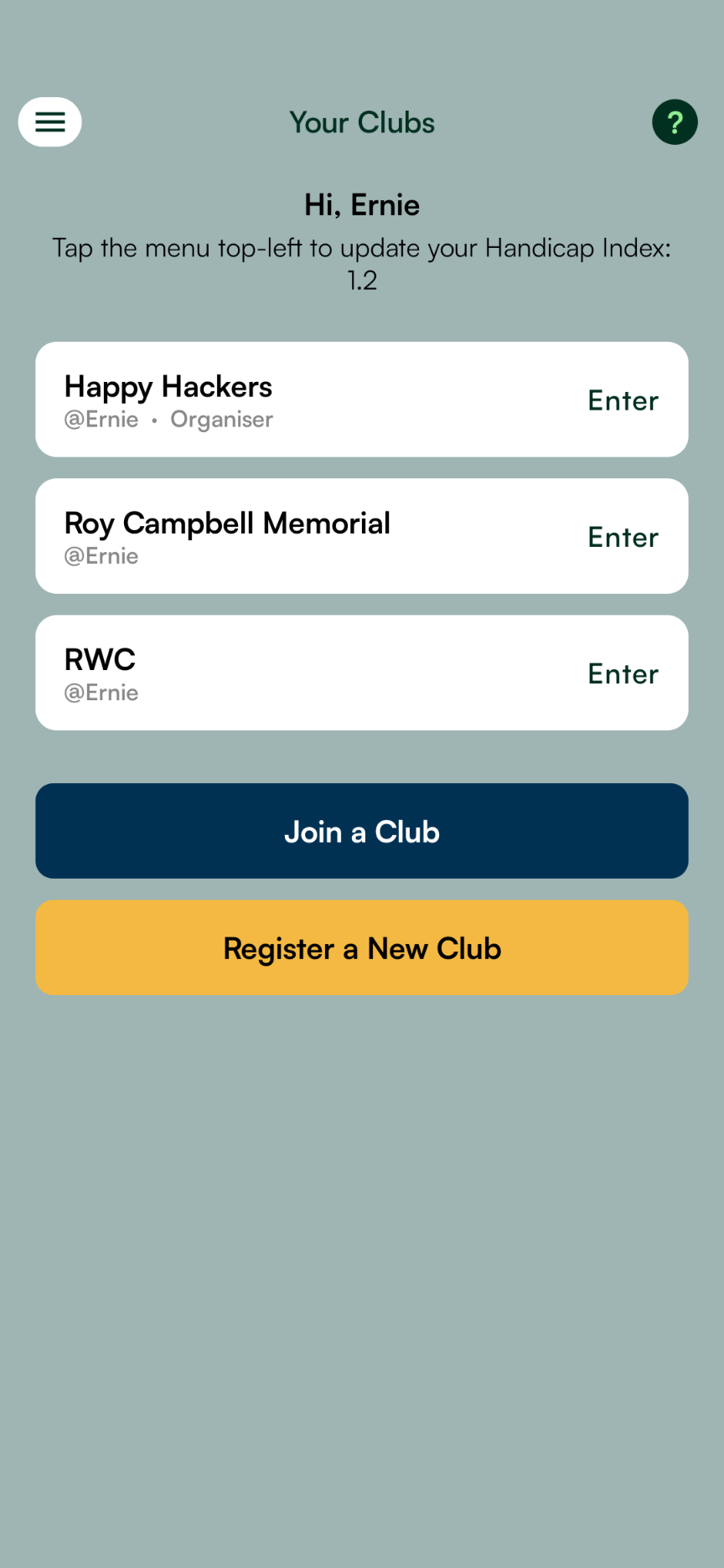
- Once you log in you land on the Club Hub. Tap Join a Club — you'll need the exact Club Name (pay attention to Upper and lower case) and the Club Code — or tap Register a New Club. You can switch between your clubs at any time from the hamburger menu.
- Once you enter a club Home page you will see two tabs: Social & Comp.
Social tab
- Tap the hamburger menu top-left > Social Games > tap the + (plus icon) top-right for the New Game page to set up a Social Game with any player in your club. Invite friends to join your club using the Club Name and Club Code. Get those details by tapping the hamburger menu > Club & Players. On that page, tap the + (plus icon) top-right to add Guest Players who can be added to both Social Games and Competitions. On the New Game page, tap + Add / Import Course to add any 18-hole course in South Africa from the Course Library.
Comp tab
- The first person to register a club becomes an Organiser: Invite friends to join your club using the Club Name and Club Code. Get those details by tapping the hamburger menu > Club & Players. On that page, tap the + (plus icon) top-right to add Guest Players who can be added to both Social Games and Competitions.
- Tap the hamburger menu > Courses > tap the + icon top-right to add a course, either from the Course Library containing all 18-hole courses in South Africa, or enter a Course Card manually. See the ? icon top-right for the help page. Once you've set up the course(s) for your competition, return to the hamburger menu > Competitions > tap the + icon top-right to set up a new competition with any players in your club. Tap the ? icon top-right for the help page.
- On the Home page in the Comp tab, tap the Competition dropdown to pick a Competition. The rounds set up by the Organiser will display in tabs near the top. Tap Tee Times & Scoring at the bottom to open the Matches page. Organisers tap the + icon top-right to add Matches for each round. Tap the ? icon top-right for the help page.
- Players tap their match on the Matches page to begin scoring on an Enter Scores page. Tap the ? icon top-right for a help page.
Competition types
- The Betterball app caters for a growing list of competition types:
Handicaps
- The Handicap Index (HI) is displayed with 1 decimal place. Tap the hamburger menu > Account Settings, Handicap to update your HI — it applies to every club you've joined. DO NOT enter the Course Handicap: the app will work it out. More below.
- The Course Handicap (CH), based on the Course Rating and Slope Rating of the Course and Tees chosen for a round, is calculated by the app and displayed with 1 decimal place. Course Handicap = Handicap Index X (Slope Rating / 113) + (Course Rating - Par)
- The Playing Handicap (PH) is displayed with 1 decimal place. In betterball, the PH = 90% of the CH, in foursomes the team's PH = 50% of the sum of both players' CHs, in greensomes, the PH = 60% of the lower CH plus 40% of the higher CH, in singles the PH = 100% of the CH.
- Matchplay Handicap (MH): the lowest handicap in the match goes to 0 and the others are reduced pro rata. Rounding only occurs at the final step, when the MH is calculated.
- In Stableford competitions, each player's Playing Handicap = Course Handicap X the round's Handicap Allowance (85% by default, but it can be adjusted), rounded to a whole number. You get your strokes on your own tee's stroke index holes, and you play against the whole field rather than against an opponent.
Scoring
- Each fourball assigns one player to keep the score in the app, and another to keep a written scorecard.
- To score: On the Home / Teams Leaderboard page, tap Tee Times & Scoring > on the Matches page tap your match > tap Start Scoring.
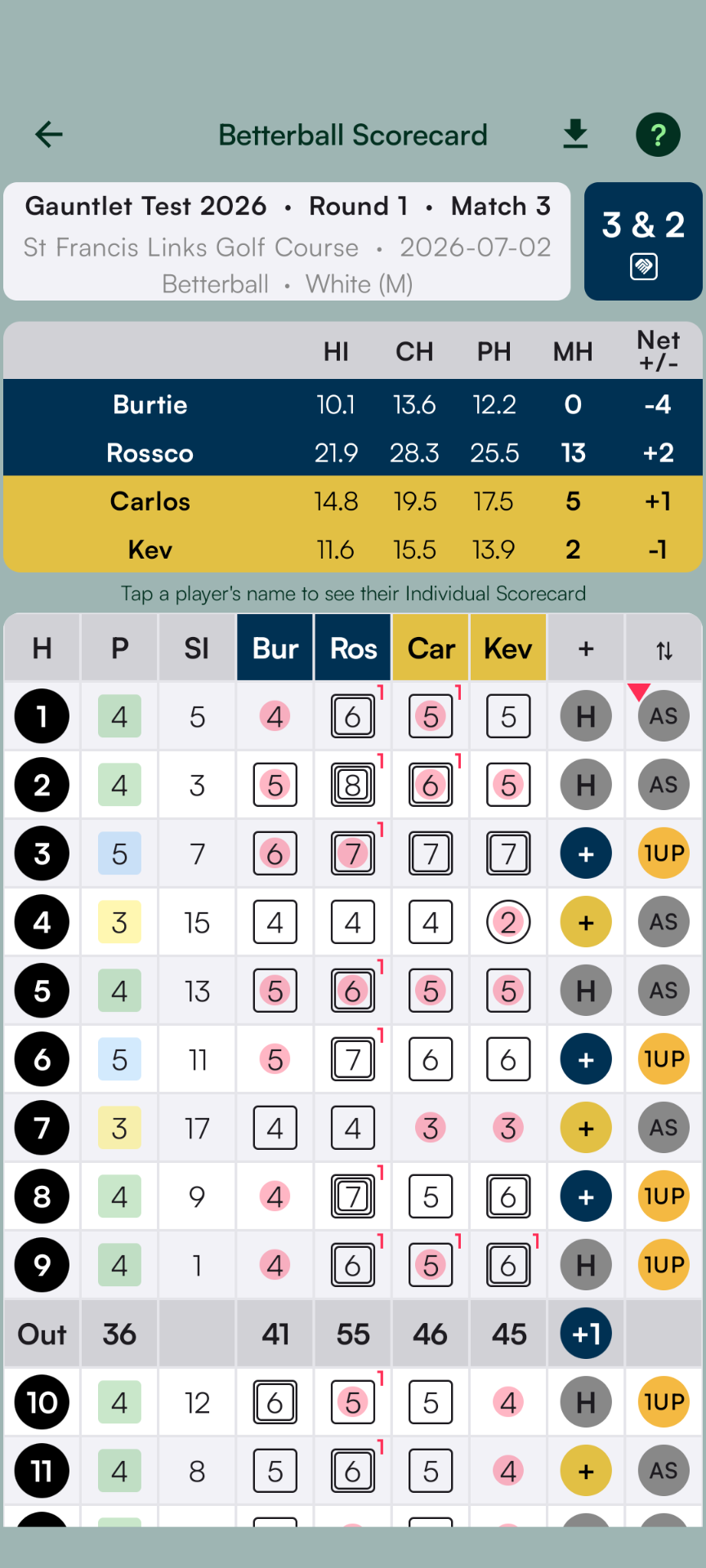
- Tap the grey predicted Net par number to accept that score: in other words to confirm it as the actual gross score, or tap the + and - to adjust. Gross scores turn red when confirmed and Net scores turn green. All scoring requires a deliberate action by the scorer. Grey numbers are not scored. The grey number is Net Par from the player's own handicap, and the + stops at 10 over Net Par. Scorers only enter Gross scores and the app calculates everything else.
- Nearest The Pin and Longest Drive for betterball, greensomes and singles rounds: Move the marker to your ball and write your name on the card. The last fourball must collect the markers. IN ADDITION, in the app, the Scorer must remember to claim Nearest The Pin (NTP) and Longest Drive (LD) if a player in the fourball beats the field. Look out for the green NTP and Longest Drive buttons that will pop up on the chosen holes. If a claim goes to the wrong player, an Organiser can tap it on the Nearest The Pin / Longest Drive page and replace the name or add a new name. The change is recorded under the claim, and the claim keeps its original place in the order.
- Once you've entered the correct scores, NTPs and LDs for every player on every hole, and you've double-checked the scores against the written scorecard, tap Submit. This locks the card for everyone, including the Scorer. If something needs correcting afterwards, an Organiser can tap Reopen Round to hand it back to the Scorer. An Organiser can also edit any Gross score directly on the Scorecard.
- While the round is open, any fourball member can tap Replace Scorer to take over the role of Scorer. Replace Scorer greys out once the card is submitted, and works again once an Organiser reopens it.
- All other players in the Club can monitor any match score in real time, view-only.
- In a Matchplay game, a Net 9 beats a Net 10, so you must enter actual Gross scores until the hole is decided. If a player blows out, picks up and surrenders the hole, and the score does not affect the Matchplay result, the Scorer can enter a Net Double Bogey.
- Stableford rounds are scored on points, not holes won. Points are awarded per hole against your Net score: double bogey or worse earns 0, bogey 1, par 2, birdie 3, eagle 4, albatross 5. In Betterball Stableford the best 1 of the team's 2 players counts on each hole; in Alliance (Two to Count) the best 2 of the team's 4 players count. The Scorer still enters only Gross scores and the app works out the strokes, the Net score and the points. If a player blows out or picks up, enter a Net Double Bogey for zero points.
Realtime Monitoring
- Go to the Home page > Comp tab to view the overall status of the competition in real time. Tap any match card to see the scorecard update in real time. Tap the Individual Leaderboard and Nearest The Pin / Longest Drive icons top-right for realtime updates.
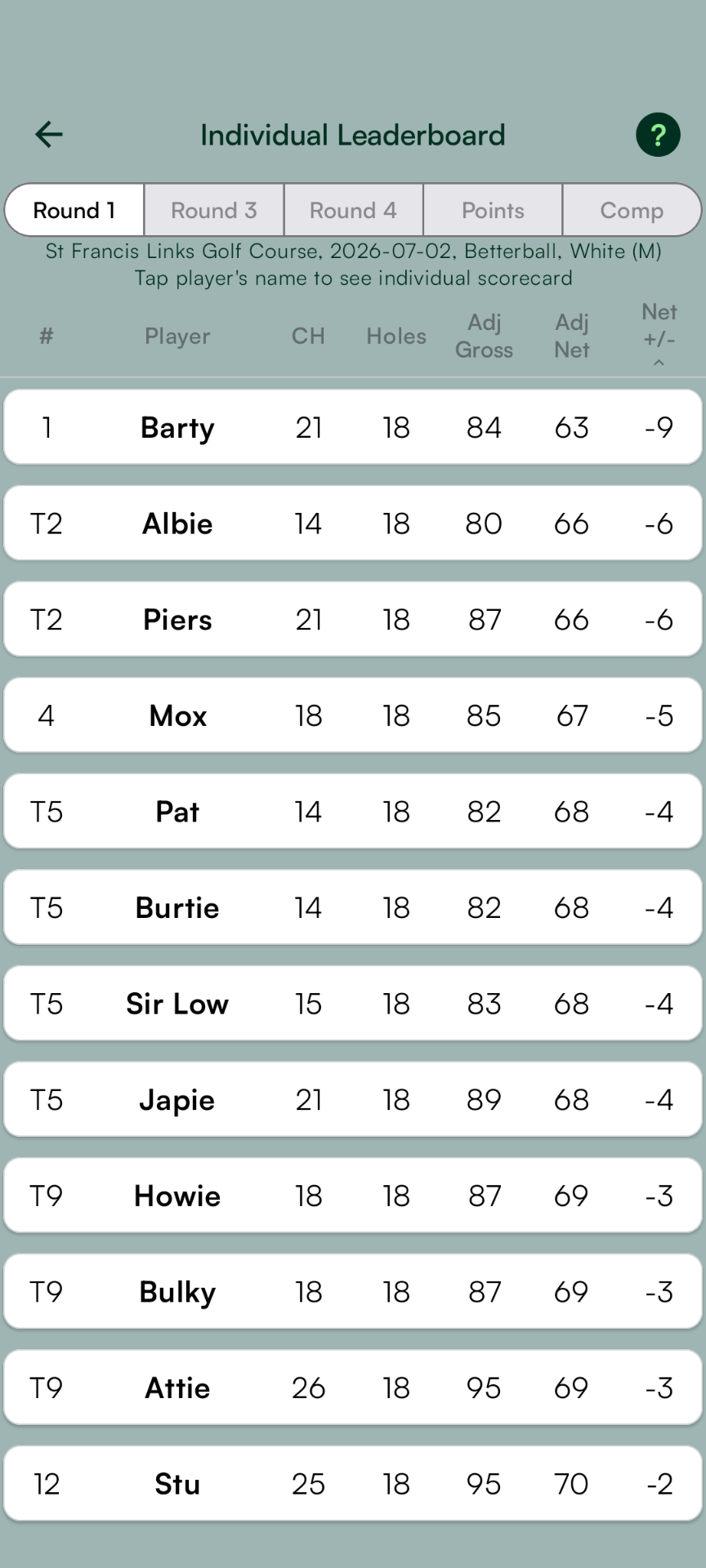
- The Individual Leaderboard shows rounds in which every player plays their own ball through the green - betterball, singles and both Stableford formats. In matchplay competitions, foursomes and greensomes rounds are excluded. Tap the Adjusted Gross, Adjusted Net and Net +/- columns to sort and tap again to reverse the sort order. In matchplay competitions, the Points tab shows team points earned by every player in every round, and the aggregate. The Comp tab shows overall leaders by team points earned: ties are broken firstly by the aggregate Adjusted Net then by Adjusted Gross in all rounds of the competition. Tap the headers to sort and tap again to reverse the sort order.
- Nearest The Pin / Longest Drive shows details for any Stableford round and in matchplay competitions for rounds in betterball, greensomes or singles formats, in which every player tees off. Foursomes rounds are excluded.
- In a Matchplay competition the Teams Leaderboard is a table with one row per team and a column for the Total plus one for each round, so it reads the same whether you have two teams or five. Every match is between two of those teams, and the match points go to one or both of those teams: a win earns 1 point and a draw earns 1/2 a point for each team.
- In a Stableford competition the Teams Leaderboard is a single ranked list: Rank, Team, Holes played, ⇅ (points against par) and Points. Teams are ranked on ⇅: the points they have scored against what net par would have earned over the holes they have played - 2 points a hole for each ball that counts - so +3 means 3 points better than par so far, and E means level. That keeps the order fair while teams are at different stages of the round, and once everyone has finished it is simply the order of total Points. Teams that have not started yet stay at the bottom of the list, with no rank. Teams level are separated by countback - the best last nine (holes 10 to 18), then the last six (13 to 18), then the last three (16 to 18), then hole 18. Teams still level share a rank: T3, for example.
Matchplay vs Individual Scorecards
- Matchplay scorecards show actual Gross scores, while the individual scorecards also show Adjusted Gross and Adjusted Net scores, based on the Course Handicap. Adjusted Gross = the actual score capped at a maximum Net Double Bogey. The Adjusted Gross total is the score you enter for handicapping purposes under the World Handicapping System (linked in-app to the USGA rules PDF).

Social Games
Easily set up a quick match with friends. Track scores hole by hole with our intuitive interface. Handicaps are automatically applied so you can focus on your swing, not the maths.